
I told myself that 2026 would be the year I would I told myself that 2026 would be the year I would get ‘me’ back and I suppose I have been on a mission! ❤️‍🔥

I’ve had this Anberlin tattoo floating around in my brain for yearsss. Finally talked through it with a friend, shared my ideas with @alexandratattoo , and she made them all come to ✨LIFE!✨ Had the best time enjoying several hours of girl talk, good music, and tattoo therapy with her - truly it is therapy and she is the best of the best!!!

I’m not sure I could ever put into words what Anberlin’s music has meant to me over the years. If you feel that way about music in any capacity - you get it. It’s definitely one of those ‘if you know, you know’ things. My Dad was a musician and he certainly passed that feeling down to me. Love that I carry that with me! 

And now I get to carry pieces of my favorite band with me. 🖤🎶
Happy birthday to my SEVEN year old tiny bebe Cohe Happy birthday to my SEVEN year old tiny bebe Cohen! He rolled his eyes at me when I said it’s crazy that he went from 6…to 7! If you know you know. 

Cohen is so sweet, kind, helpful, and smart. He loves building hot wheels tracks, setting up play areas for his little brothers, swimming, NASCAR, baseball, and never sitting still or being quiet… ever. 😆 

I’m so thankful God chose me to be his mom! I love you Cohen!! Happy birthday!!
It was a hot one at Bristol today but we had fun! It was a hot one at Bristol today but we had fun! 🏁

#bristolmotorspeedway #nascar #twinmom #boymom
Splashing around with my boys 🥰❤️☀️ Splashing around with my boys 🥰❤️☀️
Pssst. Photography magic courtesy of @m_franzetti Pssst. Photography magic courtesy of @m_franzetti when you swipe. But only if you like boudoir photos. 😜

I have the MOST FUN any time I’m in front of Michelle’s camera. She is so fun to hang out with and it ends up being the best girl time + hair and makeup! Y’all know I have 4 kids and I work from home.. I don’t get to feel fancy very often! If you like laughing until your cheeks hurt (your face cheeks) and feeling 🔥 - book a shoot with her! 10/10 highly recommend. 

#boudoirinspo #sharethelex #franzettiphotography #twinmom #boymom
Happy birthday babe! We love you so much! Thank yo Happy birthday babe! We love you so much! Thank you for all you do for us! 🎉🎂❤️
Thank goodness for spring. 🌸 2026 has been kin Thank goodness for spring. 🌸

2026 has been kind of a weird, wild ride so far, but full of good things. I started a new job! And that has taken up a lot of my time (in a good way), so I’ve been a little bit quiet around here.

I’m trying as hard as I can to prioritize myself more these days. Finally went to the doctor and did some blood work. Turns out, I’m severely anemic. I’m hoping I’ll start feeling better and little more awake after I start my iron. 😅 Maybe I can lay off the coffee a little bit. (J/k)

I can’t believe it’s almost April after we went through 3 years of January, but I’m not mad about it! Ready to relax outside on patios with family/friends and enjoy our kiddos running around. We made it. 🖤

#twinmom #momblogger #sharethelex #wfhmom
Truck washing dayyyy 🚒 Truck washing dayyyy 🚒
Last night Nate made the big mistake of saying I d Last night Nate made the big mistake of saying I don’t post pictures of him (a man who doesn’t like social media very much much or having his photo taken.) And he said this to his social media loving picture taking wife who is finally feeling the sunlight on her face after months of seasonal depression. 🤪 Might just turn this into a Nate appreciation account. Stay tuned.😉

#firewife #wfhmom #momblogger #momlife #marriagehumor
  • Looks
    • Winter
    • Spring
    • Summer
    • Fall
    • Maternity
  • Beauty
  • Kentucky
    • Lexington
    • Bourbon Trail
  • Motherhood
    • Pregnancy
    • Kawasaki Disease
  • Lifestyle
    • Fitness
    • Recipes
    • Home
    • DIY
  • Reviews
  • Video
  • Contact
  • Home
  • Start Here!
  • Freebies/Guides
  • About Me
  • Lifestyle
  • Kentucky
  • Motherhood
  • Contact Me

THIS LEXINGTON LIFE

A Life + Style Kentucky Mama Blog

  • Home
  • Start Here!
  • Guides/Freebies!
  • About Me
  • Contact

Freebies, Tutorial · December 13, 2012

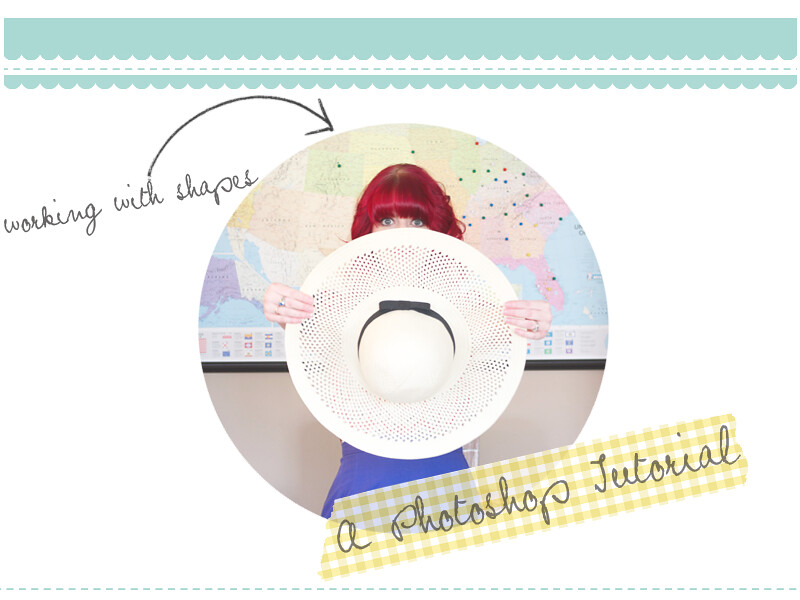
A Photoshop Tutorial: The Afterglow Circle Frame

I love using shapes to edit my photos, and I have for quite a while! Now that the Afterglow app is out – there are photo shapes everywhere! If you’re friends with me on Instagram then you probably already know that my use of the circle shape has been a little overkill. #sorrynotsorry There are a few different ways to achieve this look in Photoshop (ie: clipping masks) but for the sake of being seriously easy to explain, I’m going to show you how I transform my photos into the shape of a circle using just two layers and the eraser tool. You can download the .PSD file at the bottom of the tutorial.

If you do not have Photoshop you can use Splashup, a free online photo editor that has layer capability! I noticed that you can’t “paste” a photo onto a layer in this program, so just open the photo you want to use as your first layer and go from there!

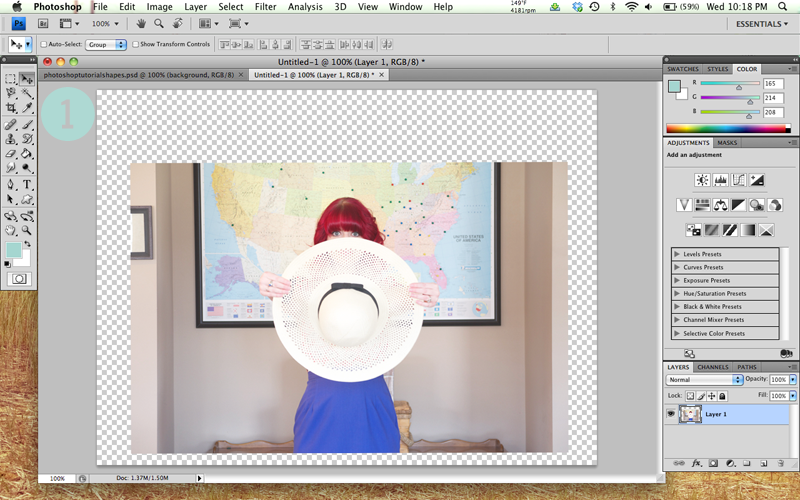
ONE:
Photoshop Tutorial: Shapes

Open a new brand new blank image (File/New), select the width and height you wish to use (I chose 800×600), and make sure that the background is set to transparent. Open the photo that you want to use in another window, resize it as needed, copy and paste it on to your transparent background. You can see above that my photo has been resized to a smaller width (700px) than my transparent background (800px). I did this so that more of the image could fit inside of my circle, since I chose to make it a bit smaller.

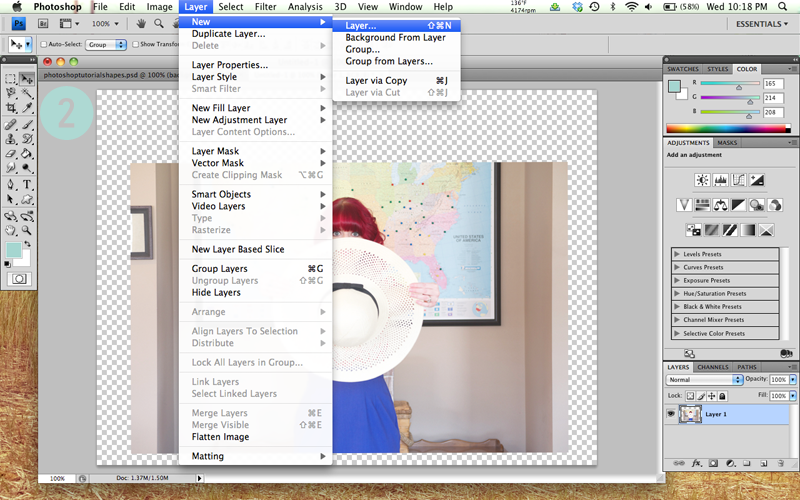
TWO:
Photoshop Tutorial: Shapes

Next, you will need to create a new layer. Make sure that your new layer is listed above your first layer in the list to the right. Now select the paint can from the menu on the left and choose your background color. I chose white because my website has a white background. We could actually make this image transparent but sometimes the illusion is easier! I’m a lazy photoshop user. ;] Fill this new layer with the color you’ve selected. Your first layer will now be covered up – it should now look like the image in Step 3!

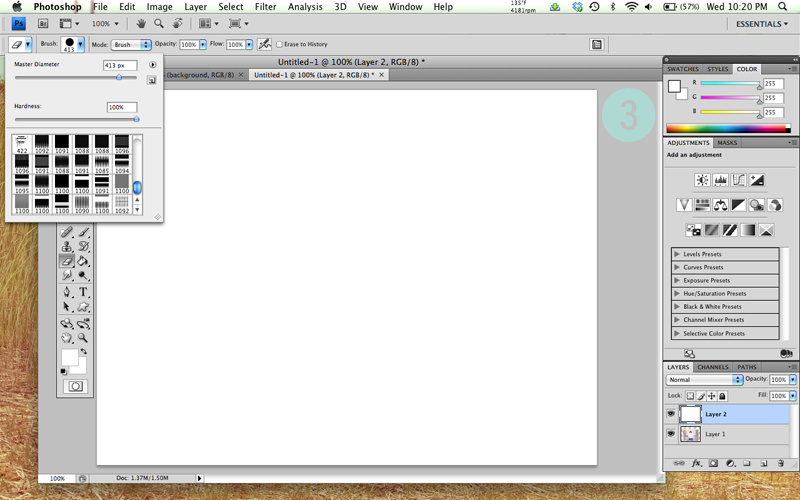
THREE:
Photoshop Tutorial: Shapes

Now you will need to select your Eraser tool. At the top left you can choose which brush you would like to use to Erase with. Choose the largest circle (my screen shot shows different brushes in the box, but you can see that I have the circle selected). Above the brushes you will see the Master Diameter slide bar- this is where you will select how large or small you want your circle to be – I chose a circle around 413px so that I could decorate around my image but you could choose to make it as wide and tall as the image you selected.

FOUR:
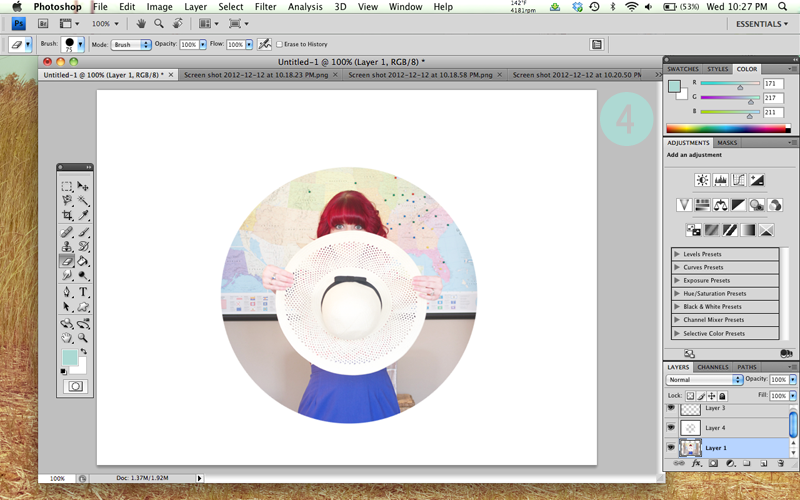
Photoshop Tutorial: Shapes

Now take your eraser brush and click once in the middle to “cut out” a hole so that the layer behind it can be seen! If the image isn’t placed exactly how you want it inside your circle simply select first layer from your layers list on the right, select the Move Tool (top right arrow in your menu on the left) and drag it around to the desired place! If your image is barely too small or barely too large for the circle you can resize it a bit by selecting the Marquee Tool (to the left of the Move tool), right click on your your chosen photo, choose “Free Transform”, and you will be able to adjust it! Sometimes this can distort a photo though if you’re making a smaller image larger- so be careful with that! A Resizing Tip: hold down the shift key while you drag the corners to resize your photo – it will retain the original shape of the photo!

And that concludes this easy-peasy tutorial! To use this “frame” again, simply save your file as a .psd file and replace the photo in your first layer with another. Feel free to download the file I created and use it if you wish! If you have any questions please feel free to shoot me an email or tweet! I don’t claim to be a Photoshop expert and I’m new at creating tutorials so if something is unclear I am happy to help!

Click Here To Download

In The Making Of This Tutorial:

Font // Found Here
Tape Strips // Found Here
Brushes // Found Here + Here

Website Pin Facebook Twitter Myspace Friendfeed Technorati del.icio.us Digg Google StumbleUpon Premium Responsive

Related posts:

No related posts.

In: Freebies, Tutorial · Tagged: afterglow, circle, frame, free, Freebies, photo, photoshop, Tutorial

You’ll Also Love

Work From Home Mom GuideFree Guide on Becoming a Present Work From Home Mom
New Grove Collaborative Haul!
Buffalo Trace

Comments

  1. Sabrina B says

    December 13, 2012 at 11:09 pm

    Great blog! I just discovered it!

    -Sabrina http://thelittleowlshop.blogspot.com

  2. goji slim says

    June 3, 2014 at 8:15 pm

    I don’t even know how I ended up here, but I thought this post was great.

    I do not know who you are but certainly you’re going to

    a famous blogger if you are not already 😉 Cheers!

    Here is my weblog: goji slim

  3. dieses zu lesen says

    September 10, 2014 at 12:33 pm

    This site was… how do I say it? Relevant!!
    Finally I’ve found something that helped me. Thank you!

  4. agent gclub says

    September 11, 2014 at 12:31 am

    สวัสดี ฉันเชื่อ นี้เป็นใหญ่ เว็บไซต์ ฉัน stumbledupon มัน ;
    ) ฉัน จะ กลับ อีกครั้ง
    ตั้งแต่ ที่ฉันได้ หนังสือ ทำเครื่องหมาย
    มัน เงินและ เสรีภาพ ที่ดีที่สุดคือ เป็น ที่ยิ่งใหญ่ที่สุด
    วิธีที่จะ เปลี่ยน คุณอาจจะ อุดมไปด้วย และยังคง ช่วยเหลือ
    อื่น ๆ .

    Take a look at my weblog agent gclub

  5. Jonah says

    September 12, 2014 at 12:19 pm

    Greetings from Carolina! I’m bored to tears
    at work so I decided to check out your blog on my iphone during
    lunch break. I really like the knowledge you present here and
    can’t wait to take a look when I get home.
    I’m surprised at how fast your blog loaded on my phone ..
    I’m not even using WIFI, just 3G .. Anyways, great blog!
    reusable bags here

  6. Home Remedies For Hair growth says

    September 13, 2014 at 4:37 pm

    Anything light will do just to keep your mind off the things that
    stresses you. While you are trying to prevent hair loss, be gentle with
    your hair. It can also help reduce skin aging and protect the skin against
    the damage caused from stresses and toxins.

    My blog; Home Remedies For Hair growth

  7. how to buy followers on vine says

    September 15, 2014 at 6:57 am

    I am curious to find out what blog system you’re using?
    I’m having some minor security problems with
    my latest website and I’d like to find something more risk-free.
    Do you have any suggestions? how to get revines and likes on vine

  8. Save using G Adventures Coupon Code Now says

    September 15, 2014 at 8:01 am

    I take pleasure in, result in I found exactly what I was
    taking a look for. You have ended my four day long hunt!
    God Bless you man. Have a great day. Bye

  9. rayban says

    September 18, 2014 at 9:52 pm

    Hi there, You’ve done a fantastic job. I’ll certainly digg it and personally recommend to my friends.
    I am sure they’ll be benefited from this web site.

    my web blog: rayban

  10. photoclippingpathservice says

    May 25, 2015 at 1:53 am

    Your work most appreciated. It will help the Photoshop folks.

  11. joolo says

    November 22, 2015 at 1:28 pm

    out of all the junk out there, finally a good tutorial

  12. Dissertation Help uk says

    December 11, 2015 at 5:58 am

    Flavorful data locales where you ought to get hold of photoshop aides. Specialists for photoshop programming is going to direct you and you simply must consider it important. In the meantime we will have interactive media library where you ought to discover data, system session and some more.

  13. Dissertation House says

    December 11, 2015 at 6:02 am

    Flavorful data locales where you ought to get hold of photoshop aides. Specialists for photoshop programming is going to direct you and you simply must consider it important. Dissertation Services In the meantime we will have interactive media library where you ought to discover data, system session and some more.

Next Post >

Winter Floral.

Welcome to This Lexington Life…


Hey y'all! I'm Steph – a proud mom of four amazing boys (including twin toddlers!), wife of a firefighter, and a spirited mompreneur.

After losing my corporate 9-5, I embraced the beautiful chaos of being a Work-From-Home Stay-At-Home Mom, turning my passions into a thriving business. Join me for relatable stories, practical tips, and a whole lot of inspiration for moms balancing motherhood and entrepreneurship. Let's tackle this exciting journey together!

>>Read More Here<<

Subscribe to my blog via email!

–follow me on YouTube!–

subscribeSubscribe to my channel
«
Prev
1
/
54
Next
»
loading
play
play
play
play
«
Prev
1
/
54
Next
»
loading

–Ads & Favorites–

adidas blogger community badge 3 Nadine West

Copyright © 2026 THIS LEXINGTON LIFE · Theme by 17th Avenue

This website uses cookies to improve your experience. We'll assume you're ok with this, but you can opt-out if you wish.Accept Read More
Privacy & Cookies Policy

Privacy Overview

This website uses cookies to improve your experience while you navigate through the website. Out of these, the cookies that are categorized as necessary are stored on your browser as they are essential for the working of basic functionalities of the website. We also use third-party cookies that help us analyze and understand how you use this website. These cookies will be stored in your browser only with your consent. You also have the option to opt-out of these cookies. But opting out of some of these cookies may affect your browsing experience.
Necessary
Always Enabled
Necessary cookies are absolutely essential for the website to function properly. This category only includes cookies that ensures basic functionalities and security features of the website. These cookies do not store any personal information.
Non-necessary
Any cookies that may not be particularly necessary for the website to function and is used specifically to collect user personal data via analytics, ads, other embedded contents are termed as non-necessary cookies. It is mandatory to procure user consent prior to running these cookies on your website.
SAVE & ACCEPT